

How to create a customer account
Fill in the sign-up form, verify your email and sign in to your customer panel. It takes about two minutes.
Getting started · 2 min read
You need a customer account to order hosting, a server or a domain. Your account lets you manage orders, invoices, services and support tickets in one place.
1. Open the sign-up page
Click Sign up at the top right of the site. If you already have an account, use the Sign in link instead.
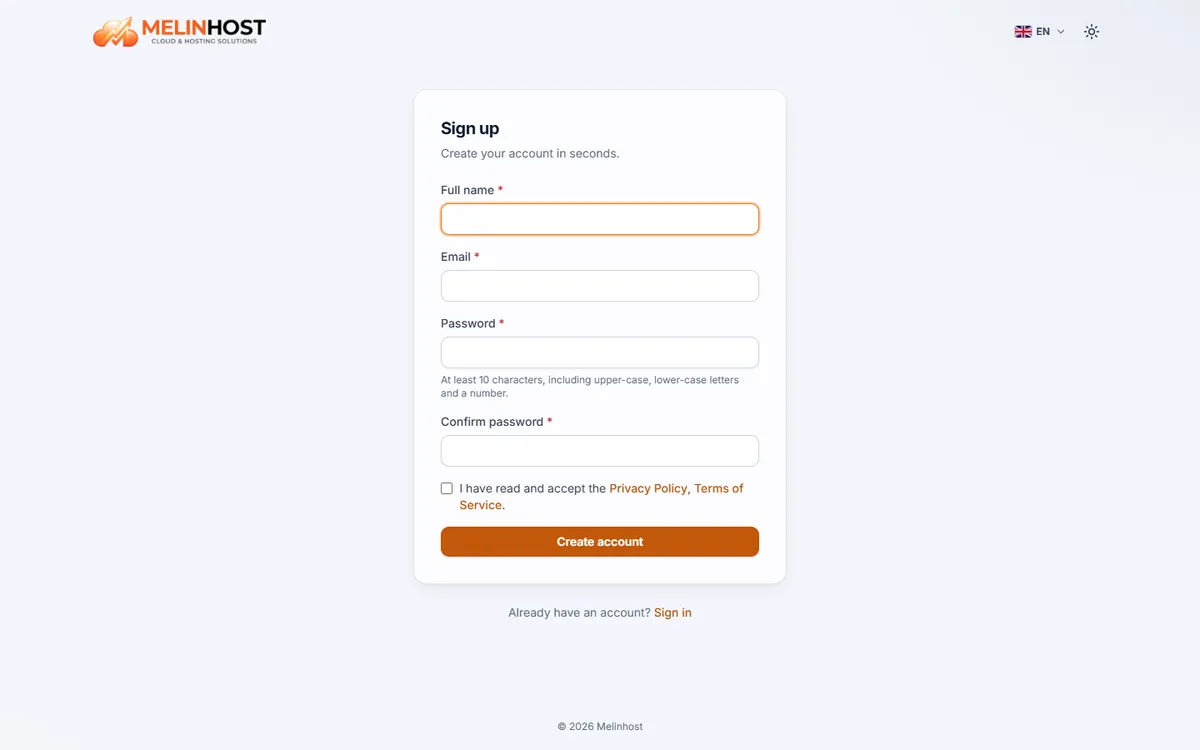
2. Fill in the form
- Full name: the name shown on your invoices and account.
- Email: use an address you check often; the verification link, invoices and service details are sent here.
- Password: at least 10 characters, with an upper-case letter, a lower-case letter and a digit.
- Repeat password: type the same password again.
- Read the Privacy Policy and Service Agreement and tick the checkbox.
3. Verify your email
After you click Create account, a verification link is sent to your email address. Click it to verify your address; orders and panel actions stay locked until verification is complete.
Email not arriving? Check your spam or junk folder first. If it is not there, use the resend button on the verification page.
4. Sign in and complete your profile
After verification, sign in to reach your customer panel. We recommend completing your billing details (individual or company, tax information) on the Profile page so that invoices are issued correctly.