

Account security and two-factor authentication (2FA)
Turn on two-factor authentication, use a strong password, review your active sessions and stay safe from phishing.
Getting started · 2 min read
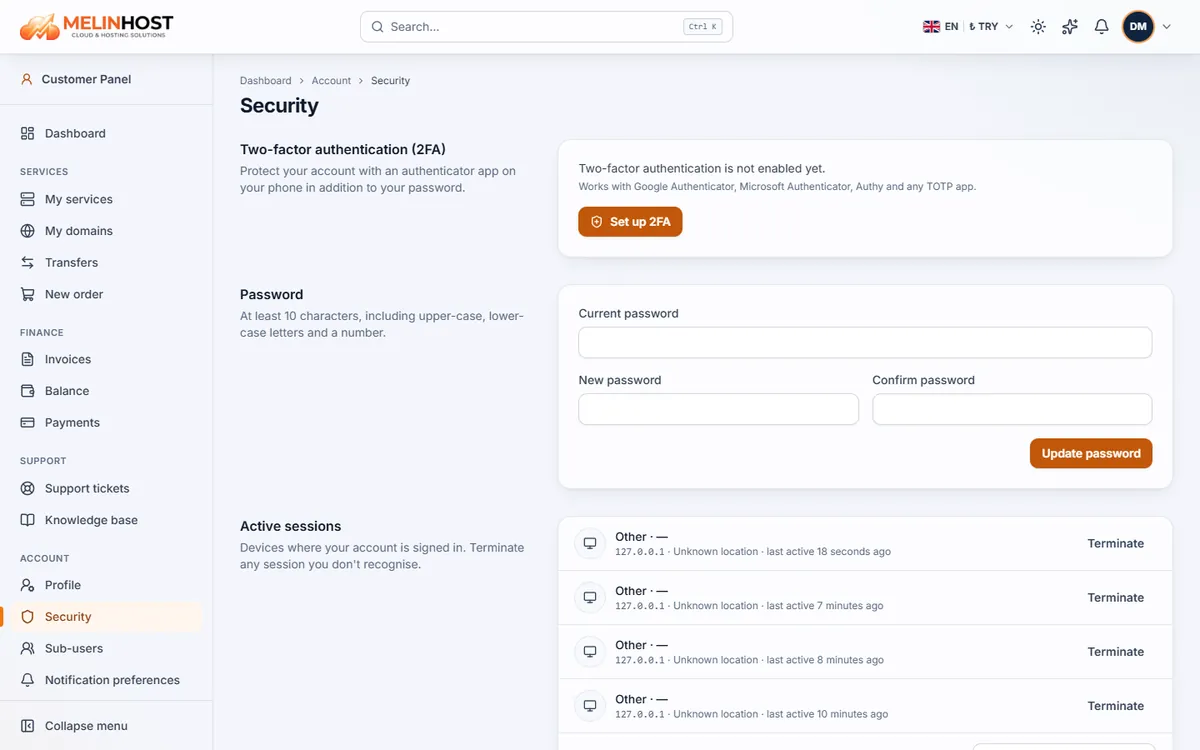
Your account gives access to your services, invoices and server details. A few simple measures make it far safer. All settings are in the customer panel under Account › Security.
Turning on two-factor authentication (2FA)
With 2FA, signing in requires a 6-digit code from an app on your phone in addition to your password. Even if your password is stolen, your account stays locked.
- Install an authenticator app such as Google Authenticator, Microsoft Authenticator or Authy (any TOTP app works).
- On the Security page click Set up 2FA.
- Scan the QR code on screen with your app.
- Enter the 6-digit code the app shows to confirm.
- Save your recovery codes somewhere safe. Each can be used once if you lose access to your phone, and they are never shown again.
Important: keep the recovery codes in a file on your computer or in your password manager. When they run out, use Regenerate recovery codes to create new ones.
A strong password
- At least 10 characters with an upper-case letter, a lower-case letter and a digit.
- Choose one you use nowhere else and that is hard to guess; a password manager makes this easy.
- Change it in the Password section of the same page by entering your current password.
Active sessions and sign-in history
Active sessions lists the devices where your account is signed in. If you see one you don’t recognise, click Terminate and change your password; Terminate all other sessions closes everything except this device. Sign-in history shows recent attempts with time, result, IP and device.
Staying safe from phishing
- Never share your password, 2FA code or recovery codes with anyone; our support team will not ask for them.
- Before signing in, check that the site is on the correct domain and the connection is secure (padlock icon).
- Do not click links in urgent emails such as “your account will be suspended”; go to the site directly and check in the panel.
If you notice a suspicious email or an unauthorised action on your account, open a support ticket right away.