

Upgrading your plan and changing the billing cycle
Moving to a bigger plan, the prorated difference invoice, and switching from monthly to yearly billing.
Managing services · 2 min read
When your needs grow you can move to a bigger plan, and by choosing a longer billing period you can benefit from a discount. Both are on the service’s Billing & plan tab.
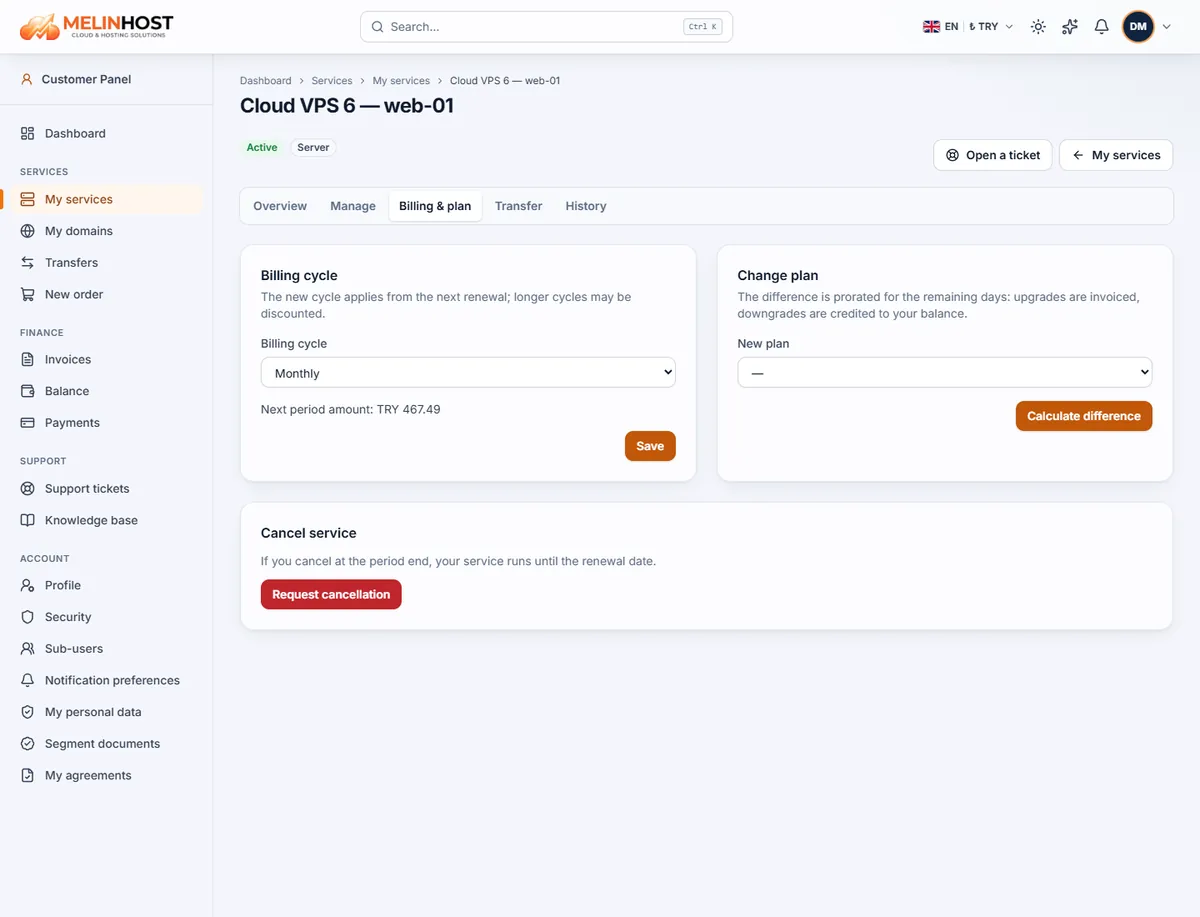
Changing the billing cycle
- Open your service from My services and go to the Billing & plan tab.
- Choose the new period from the Billing cycle list (monthly, 3, 6, 12, 24 months and so on, depending on the product). The next period’s amount is shown below.
- Click Save.
The new period applies from the next renewal; it does not affect the current period and nothing extra is charged. Longer periods can be discounted — for example hosting plans include 2 free months with yearly payment.
Upgrading the plan
- In the Change plan box pick the plan you want from the New plan list.
- Click Calculate difference. The difference is prorated for the remaining days: (new period amount − current period amount) × remaining days ÷ days in the period.
- If the difference is positive a difference invoice is created; the new plan is applied once you pay it. See Payment methods for how to pay.
Good to know: our team completes the change; on a running service the server or hosting change is applied after the invoice is paid. For a move to a smaller plan you can open a ticket.
Need an add-on?
For extras such as an additional IP, more disk or backups, create a request with Add-on (IP, disk, backup) on the service’s Manage tab.